I kept asking myself “what is still running on port 5173?” So I built a small Omarchy plugin that answers it, and today I published it.
It is called Ports. One icon in the bar with a number. Click it and you see every dev server you have running, with the name of the project it came from.
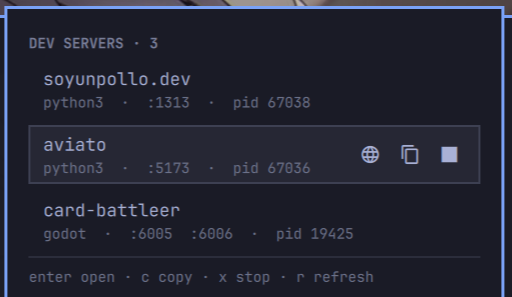
What Omarchy plugins are
Omarchy 4 has a plugin system. A plugin is a folder with a manifest.json and some QML files:
{
  "schemaVersion": 1,
  "id": "io.github.rubenmeza.ports",
  "name": "Ports",
  "kinds": ["bar-widget"],
  "entryPoints": { "barWidget": "Panel.qml" }
}
There are six kinds. A bar-widget lives in the bar. An overlay covers the screen when you summon it. A service runs with no interface at all.
One thing to understand before you write any code: your plugin runs inside the shell process, with no sandbox. It is not a separate app. If your QML is slow or wrong, the whole bar feels it. So I decided early that all the real work would happen in a small bash script, and the QML would only read its output.
The design in one line per rule
I wrote the rules down before writing code, and this saved me later:
- Only show sockets that belong to me. The kernel only tells you the process of your own sockets, so system services never appear. The filter is free.
- One row is one process, not one port. My Godot editor holds two ports. That is one server, not two.
- Name each row after the git repo, not the folder. A server started inside a monorepo package shows the repo name.
- Ask before stopping anything.
The script prints JSON, and I can run it in a terminal:
$ ./bin/ports-scan | jq
[
  {
    "pid": 19425,
    "comm": "godot",
    "ports": [6005, 6006],
    "project": "card-battleer",
    "exposed": false
  }
]
This was the best decision of the day. Every time something looked wrong in the bar, I ran the script and knew in two seconds if the problem was the data or the interface.
Which ports can open a browser
Not every port is a web server. Godot listens on 6005 for its debugger. If you click “open” there, your browser waits forever.
So the plugin asks each new port one question:
curl --head --max-time 0.4 http://127.0.0.1:6005
If it answers, the row gets an open button. If not, you only get copy and stop. The answer is saved until that server dies, so the question is asked one time, not on every refresh.
The bugs
This is the part I want to remember.
k was already taken
I bound k to “stop the server”. Nothing happened. I pressed it many times.
Omarchy’s key handler uses vim keys. k is up:
if (event.key === Qt.Key_Up || event.text === "k") {
  moveRequested(0, -1); event.accepted = true; return
}
My key never arrived. And the shell already has a convention for the destructive action on a row: x. So now stop is x, like everywhere else in the shell. Reading the component I was using would have been faster than testing my own guess.
The linter that always says yes
I ran qmllint on my files. Clean.
I did not believe it, so I added a broken line on purpose and ran it again. Still clean.
/usr/bin/qmllint is the Qt5 one. With -I it exits 0 on anything, even a file with a syntax error. The real one is /usr/lib/qt6/bin/qmllint. And it needs the correct import root, because the shell modules are called qs.Ui and qs.Commons:
mkdir -p /tmp/qmlroot
ln -sfn ~/.local/share/omarchy/shell /tmp/qmlroot/qs
/usr/lib/qt6/bin/qmllint -I /tmp/qmlroot Panel.qml
Lesson: when a tool says everything is fine, break something on purpose and check that it complains.
My tests appeared in my bar
My test suite starts real servers on loopback and kills them at the end. One test starts a server that forks two children. The cleanup killed the parent. The children kept the socket.
I saw it because a strange row appeared in the real widget: a project called scratch-dir on port 49738. My tests were leaking processes into my own desktop.
Now each fixture runs in its own process group and cleanup kills the group:
serve() {
  ( cd "$1" && exec setsid python3 -m http.server "$3" --bind "$2" >/dev/null 2>&1 ) &
  PIDS+=("$!")
}

cleanup() {
  for pid in "${PIDS[@]:-}"; do
    kill -TERM -"$pid" 2>/dev/null || kill -TERM "$pid" 2>/dev/null
  done
}
That leak also found a real bug: a process whose folder was deleted reports /path (deleted) in /proc/<pid>/cwd, and my label showed scratch-dir (deleted).
The question that disappeared
Stopping a server sends SIGTERM. If the server is still there after five seconds, the plugin offers SIGKILL as a second question. I never escalate alone.
But I wrote this:
if (!server || !root.opened) return
If you closed the panel during those five seconds, the question was dropped in silence. You asked to stop a server, and it kept running, and nobody told you.
Now the panel opens itself to ask. Which gave me a second bug: the panel opened, but pressing Enter did nothing, because KeyboardPanel gives the keyboard to its focusTarget, and mine always pointed at the list. A panel that opens to ask a question has to give the keyboard to the question:
focusTarget: root.confirmOpen ? confirmFocus : keyCatcher
Small ones
$(< /proc/$pid/comm)returns an empty string in bash, because procfs reports these files as size zero. Useread -r comm < /proc/$pid/comm.rescanPluginsdoes not reload a widget that is already on the bar. Editing QML needsomarchy-restart-shell.grimuses logical coordinates. My screen is 1920x1080 with scale 1.6, so the pixel positions I read from a screenshot were not the numbers to crop with.
Then I found out it already existed
Near the end I checked the marketplace registry properly. I found Portboard, listed two weeks before mine. Then I looked again, with better search words, and found four more.
Listening ports are one of the most crowded corners of the marketplace:
- Omaports — a bar widget with a count and a panel, ports named by project. Almost exactly my design, published first.
- Portboard — a full screen panel you summon and filter by typing, plus an fzf version for SSH.
- omaport — a bar widget for inspecting and managing local ports.
- okurmustafa/omarchy-ports — same idea for servers: it maps each port to its systemd unit and can restart the service.
- yuler/omaports — which I only found when I wrote a script to search properly.
Omaports hurt a little to read. Same shape, same idea, and it names ports better than mine: it reads the command line and shows 3000 · Vite, while I show node. It can also open a terminal in the project folder. That person did the work before me and did part of it better.
My mistake was hours earlier. I looked at the marketplace website, the page said “0 plugins”, and I believed it. The page builds its list with JavaScript, so my check saw an empty page. The real registry has 1673 entries, sitting in a JSON file in the marketplace repo the whole time. I read the page instead of the data.
I thought about deleting my plugin. I did not, for two reasons.
First, they are not the same. Mine groups by process, not by port: my Godot editor is one row with two ports, and a server with worker processes is one row, not five. It asks a port if it speaks HTTP before offering to open it, so a database port never sends you to a dead browser tab. And stopping is two questions, not one key: it sends SIGTERM, and if the server is still alive five seconds later it asks again before SIGKILL.
Second, the registry already has five Docker plugins. Different shapes of the same idea can live together.
So I published mine, and my README now lists the neighbours with what each one does better than mine. If you want typing filters or framework names, install theirs instead. That is not modesty, it is just true.
Then I wrote the thing I should have had on day one:
$ ./scripts/registry-check port listen
Registry: 1673 listed sources
LISTED: 12 match(es)

  mich-nduka/omaports
    ids: io.github.mich-nduka.omaports
    Open dev ports on localhost in the Omarchy bar...
It searches the registry and GitHub, and it also finds plugins that exist on GitHub but were never listed. It taught me one more thing immediately: search by word stem. ports does not match portboard.
Install
omarchy plugin add https://github.com/rubenmeza/omarchy-ports.git --enable
Removing it:
omarchy plugin remove io.github.rubenmeza.ports
Local development
If you want to build your own plugin, this is the loop I use. Symlink your repo into the plugins folder, and every edit is live:
ln -sfn "$PWD" ~/.config/omarchy/plugins/io.github.rubenmeza.ports
omarchy-shell shell rescanPlugins
omarchy plugin enable io.github.rubenmeza.ports --section right
Validate with the real path, not the link. The validator refuses symlinks inside a plugin folder, and pointing it at the link fails that check:
omarchy plugin validate ~/Dev/omarchy-ports
Bash and manifest changes are picked up alone. QML changes need omarchy-restart-shell.
What I take from this
Checking if something already exists is part of the work, not something you do at the end. And when you check, read the data, not the website.
The rest is the usual lesson in a new shape: read the component before you extend it, and never trust a green result you did not try to make red.